
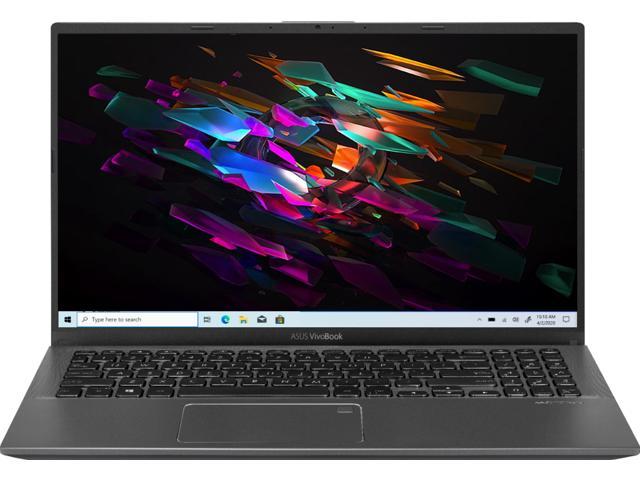
ASUS VivoBook S 14 OLED Slim Laptop, 14″ 2.8K 16:10 Display, Intel Evo Platform, Intel Core i7-12700H CPU, 16GB RAM, 512GB SSD, Windows 11 Home, Indie Black, K3402ZA-DB74
SKU: N82E16834236286Thương hiệu: ASUS
Còn hàng· Giao hàng sau 3 ngày
39.554.190 ₫
Giá chưa gồm VAT 8% · Đã gồm VAT: 42.718.525 ₫ / sản phẩm
Hoặc thuê từ 1.318.473 ₫/tháng — phù hợp cho dự án ngắn hạn.
Điện ước tính: 47 kWh/tháng · ~152.100 ₫/thángTính TCO chi tiết
Tạm tính: 39.554.190 ₫
Bảo hành 24 tháng
Chính hãng
Giao sau 3 ngày
Toàn quốc
Hỗ trợ kỹ thuật
24/7 qua hotline
Hoá đơn VAT
Đầy đủ, đúng hạn
Mua càng nhiều, giá càng tốt
| Số lượng | Đơn giá | Tiết kiệm |
|---|---|---|
| 1–2 máy | 39.554.190 ₫ | — |
| 3–9 máy | 38.367.564 ₫ | −3% |
| từ 10 máy | 37.180.939 ₫ | −6% |
Giá trên chưa gồm VAT. Đơn từ 20 máy trở lên hoặc kèm dịch vụ triển khai, gọi 1900 636 106 để có mức riêng.
Máy lắp vừa linh kiện này
tham khảo theo thông số trên tên hàngMô tả sản phẩm
var ccs_cc_args = ccs_cc_args || []; ccs_cc_args.push([‘mf’,’Asus’]); ccs_cc_args.push([‘pn’,’K3402ZA-DB74′]); ccs_cc_args.push([‘upcean’, ”]); ccs_cc_args.push([‘lang’, ‘en’]); ccs_cc_args.push([‘market’, ‘US’]); (function () { var o = ccs_cc_args; o.push([‘_SKey’, ‘1b1e8766’]); o.push([‘_ZoneId’, ‘faa3fafd5b’]); var sc = document.createElement(‘script’); sc.type = ‘text/javascript’; sc.async = true; sc.src = (‘https:’ == document.location.protocol ? ‘https://’ : ‘//’) + ‘cdn.cs.1worldsync.com/jsc/h1ws.js’; var n = document.getElementsByTagName(‘script’)[0]; n.parentNode.insertBefore(sc, n); })();
Learn more about the ASUS K3402ZA-DB74
| Best Seller Ranking | #86 in Laptops / Notebooks |
|---|
| Brand | ASUS |
|---|---|
| Series | VivoBook S |
| Model | K3402ZA-DB74 |
| Part Number | 90NB0WE2-M00190 |
| Color | Indie Black |
|---|---|
| Operating System Operating System | Windows 11 Home 64-bit |
| CPU CPU | Intel Core i7-12700H 2.30 GHz |
| Screen | 14″ 2.8K OLED 90 Hz |
| Memory Memory | 16 GB DDR4 |
| Storage Storage | 512 GB PCIe SSD |
| Graphics Card Graphics Card | Intel Iris Xe Graphics |
| Video Memory Video Memory | Shared memory |
| Dimensions (W x D x H) | 12.46″ x 8.84″ x 0.74″ |
| Weight | 3.31 lbs. |
| Other Features | Intel Evo Platform |
| CPU Type | Intel Core i7 12th Gen |
|---|---|
| CPU Speed CPU Speed | 12700H (2.30GHz) |
| Core Name | Alder Lake |
| Turbo Frequency Turbo Frequency | Up to 4.70 GHz |
| Number of Cores Number of Cores | 14-core (6P+8E) Processor |
| CPU L3 Cache CPU L3 Cache | 24 MB |
| Screen Size Screen Size | 14.0″ |
|---|---|
| Touchscreen Touchscreen | No |
| Wide Screen Support Wide Screen Support | Yes |
| Display Type | WQXGA+ |
| Resolution Resolution | 2880 x 1800 |
| Panel | OLED |
| Color Gamut | 100% DCI-P3 |
| LCD Features | 90 Hz, OLED 16:10, Bend+400nits(HDR), Glare, DCI-P3:100% |
| Operating System | Windows 11 Home 64-bit |
|---|
| GPU/VPU GPU/VPU | Intel Iris Xe Graphics |
|---|---|
| Video Memory | Shared system memory |
| Graphic Type Graphic Type | Integrated Card |
| SSD | 512 GB PCIe |
|---|---|
| HDD | No |
| Memory Memory | 16GB |
|---|---|
| Memory Spec | 8 GB onboard + 8 GB x 1 |
| Memory Slot (Total) | 1 |
| Memory Slot (Available) | 0 |
| Optical Drive Type | No |
|---|
| WLAN WLAN | 802.11ax Wireless LAN |
|---|---|
| WiFi Generation | Wi-Fi 6E |
| Bluetooth Bluetooth | Bluetooth 5.2 (Dual band) 2×2 |
| USB USB | 1 x USB 2.0/1.1 / 1 x USB 3.2 Gen 1 Type-A |
|---|---|
| Thunderbolt | 2 x Thunderbolt 4 supports display / power delivery |
| HDMI | 1 x HDMI 2.0b |
| Audio Ports | 1 x 3.5mm Combo Audio Jack |
| Touchpad | NumberPad |
|---|---|
| Keyboard | Backlit Chiclet Keyboard |
| Backlit Keyboard | Backlit |
| Webcam Webcam | 720p HD camera, With privacy shutter |
| Style | Standard |
|---|---|
| Type | Home / Personal |
| Usage | Consumer |
| AC Adapter | TYPE-C, 90W AC Adapter Output 20V DC, 4.5A, 90W Input: 100~240V AC 50/60Hz universal |
|---|---|
| Battery | 70WHrs, 3S1P, 3-cell Li-ion |
| Dimensions (W x D x H) | 12.46″ x 8.84″ x 0.74″ |
|---|---|
| Weight | 3.31 lbs. |
| Package Content | Backpack |
|---|
| Date First Available | July 29, 2022 |
|---|
like a bomb in disguise9/21/2022 11:19:17 AM
Pros: none
Cons: defective over heats windows 11 laggy blue screen of death and black screen of death
Overall Review: for the first day it was fine but after some use problems started happening in for instance, I was just using it for browsing Google Chrome and it would literally stop responding then I’d get a bsod error everything was frozen while using the laptop the start menu wouldn’t show up everything would just freeze up to a bsod I did eventually get a black screen of death too but it was fixed by a restart so this is doa with temperatures at above 92c crazy too feels like a bomb it did burn my hands too if I touch the bottom would never buy a product like this again from asus and talk about noisy fans even in whisper mode so I just got the macbook all in all a better product than this bomb in disguise I did even smell smoke so not sure if it a feature of the product or defect lols
Manufacturer Response:
Dear Valued Customer,
I’m sorry to hear that the unit is blue-screening and overheats. This is not the kind of experience we want our customers to have. Have you tried to update the Windows OS and drivers? You can attempt the steps below. For further troubleshooting, feel free to reach out to me at customerloyalty@asus.com and provide this link for reference. I’ll do my best to provide a quick resolution to your case. Your feedback is important as it helps with improvements to ASUS Support channels.
Thank you for choosing ASUS!
Best Regards,
Jamalie,
ASUS Customer Loyalty US Support
Troubleshooting – https://www.asus.com/support/FAQ/1042499/
Troubleshooting2 – https://www.asus.com/support/FAQ/1015064/
Điểm nổi bật
- VivoBook S 14 OLED is protected by ASUS Antibacterial Guard – a surface treatment that keeps the bugs at bay
- Nền tảng Intel Core
- Bộ nhớ DDR4 tối đa 16GB
Sản phẩm tương tự
Khách hàng cũng xem